Using Google Sheets as a database to extract data converted to Markdown
Using Google Sheets API, this little tool reads a spreadsheet, extract relevant data and converts it into Markdown so it can be repurposed, in the example given to generate an HTML output for this website with Pelican, a powerful static site generator.
Introduction#
The purpose of this tool is to parse and convert the content of a Google Sheets spreadsheet to Markdown. In this specific case, I just wanted a simple script to reduce the friction in getting a valid output I could use to maintain a “learning log” on my website. So that gives me a quick way to input data in a spreadsheet and then I can take the time whenever needed to update the learning progress as desired by reformatting any of the entries and optionally adding notes to them.
General software requirements#
This tool should:
- Be able to read a private spreadsheet with a service account configured with the Google Sheets API.
- Convert rows from a Google Sheets spreadsheet into Markdown (see Input and Output sections below for details).
- Skip rendering rows that are missing a value for the
TitleorDatecolumns (it couldn’t be rendered in the correct place properly without this information).- Other columns are optional and the corresponding level of nesting will be skipped if no value was provided (e.g. a category
Articlesmay have an item with no sub-category and could be missing any of the other values except forTitleandDate).
- Other columns are optional and the corresponding level of nesting will be skipped if no value was provided (e.g. a category
- Separate entries by month by parsing the
Datecolumn.- A command-line parameter should exist to specify a year from which the date should be extracted.
- The output should be in reverse chronological order (i.e. for a full year with entries for each month, December will appear at the top and January at the bottom).
- Output a hierarchical format like the following:
Category > Sub-category > Title > Activity & notes - Group entries by category and sub-category (e.g. if a category is named
Articlesand there is a sub-category namedPython, thenPythonmust be nested underArticlesfor the corresponding month). - Sort on the
Datecolumn before doing any parsing on other columns (rows in the spreadsheet can be in non-chronological order).- Dates from a single year will be kept (either the year received as a parameter or the most recent year found).
- Sort
Category,Sub-categoryandTitlealphabetically (ascending order from top to bottom). - Not sort the
Activitycolumn to preserve the order in which rows were added to the spreadsheet. - Render links only if the
Linkcolumn is a valid URL. - Not validate the content of columns except for
DateandLink(i.e. render the other columns as is). - Display items with no category above those having a category. The same logic would be true for sub-categories.
- Format the output:
Dateshould become headers (##).Categoryshould be bolded.Sub-categoryshould be emphasized.Titleshould become a link if theLinkcolumn contains a valid URL.Activityshould be nested underTitle, occupying a new line for each activity.Notesshould appear (italicized and inside parentheses) next to the activity.- If there is a value for
Notesbut no value forActivity, the output would be next to theTitle.
- If there is a value for
Input#
A spreadsheet with the following columns (starting with Date):
| [additional info] | Date | Category | Sub-category | Title | Activity | Link | Notes |
|---|---|---|---|---|---|---|---|
| November | 13/11/2021 | Articles | Python | Python slots, slots, and object layout | https://www.youtube.com/watch?v=Iwf17zsDAnY | understood that X does Y | |
| November | 14/11/2021 | Books | Software engineering | The Pragmatic Programmer | ch. 1 | https://pragprog.com/titles/tpp20/the-pragmatic-programmer-20th-anniversary-edition/ | note 1 here |
| November | 15/11/2021 | Books | Software engineering | The Pragmatic Programmer | ch. 2 | note 2 here too | |
| November | 16/11/2021 | Books | Software engineering | Clean Code | |||
| December | 1/12/2021 | Documentation | Python | The Python Tutorial | Sections 1-4 | https://docs.python.org/3/tutorial/index.html | |
| December | 2/12/2021 | Books | Software engineering | Clean Code | ch. 2-10 | ||
| Render available values | 2/12/2021 | Books | Clean Coder | book note | |||
| Render available values | 2/12/2021 | Python/C API Reference Manual | https://docs.python.org/3/c-api/index.html | ||||
| Title missing: skip rendering | 3/12/2021 | Articles | |||||
| Title missing: skip rendering | 3/12/2021 | Articles | Software engineering | ch. 3 | https://docs.python.org/3/c-api/index.html | note | |
| Date missing: skip rendering | Articles | Python | Python slots, slots, and object layout | Section 2 | https://www.youtube.com/watch?v=Iwf17zsDAnY | note not rendered |
Output#
A Markdown output to the terminal in the following format:
## December

- [Python/C API Reference Manual](https://docs.python.org/3/c-api/index.html)
- **Books**
  - Clean Coder (_book note_)
  - _Software engineering_
    - Clean Code
      - ch. 2-10
- **Documentation**
  - _Python_
    - [The Python Tutorial](https://docs.python.org/3/tutorial/index.html)
      - Sections 1-4

## November

- **Articles**
  - _Python_
    - [Python slots, slots, and object layout](https://www.youtube.com/watch?v=Iwf17zsDAnY) (_understood that X does Y_)
- **Books**
  - _Software engineering_
    - Clean Code
    - [The Pragmatic Programmer](https://pragprog.com/titles/tpp20/the-pragmatic-programmer-20th-anniversary-edition/)
      - ch. 1 (_note 1 here_)
      - ch. 2 (_note 2 here too_)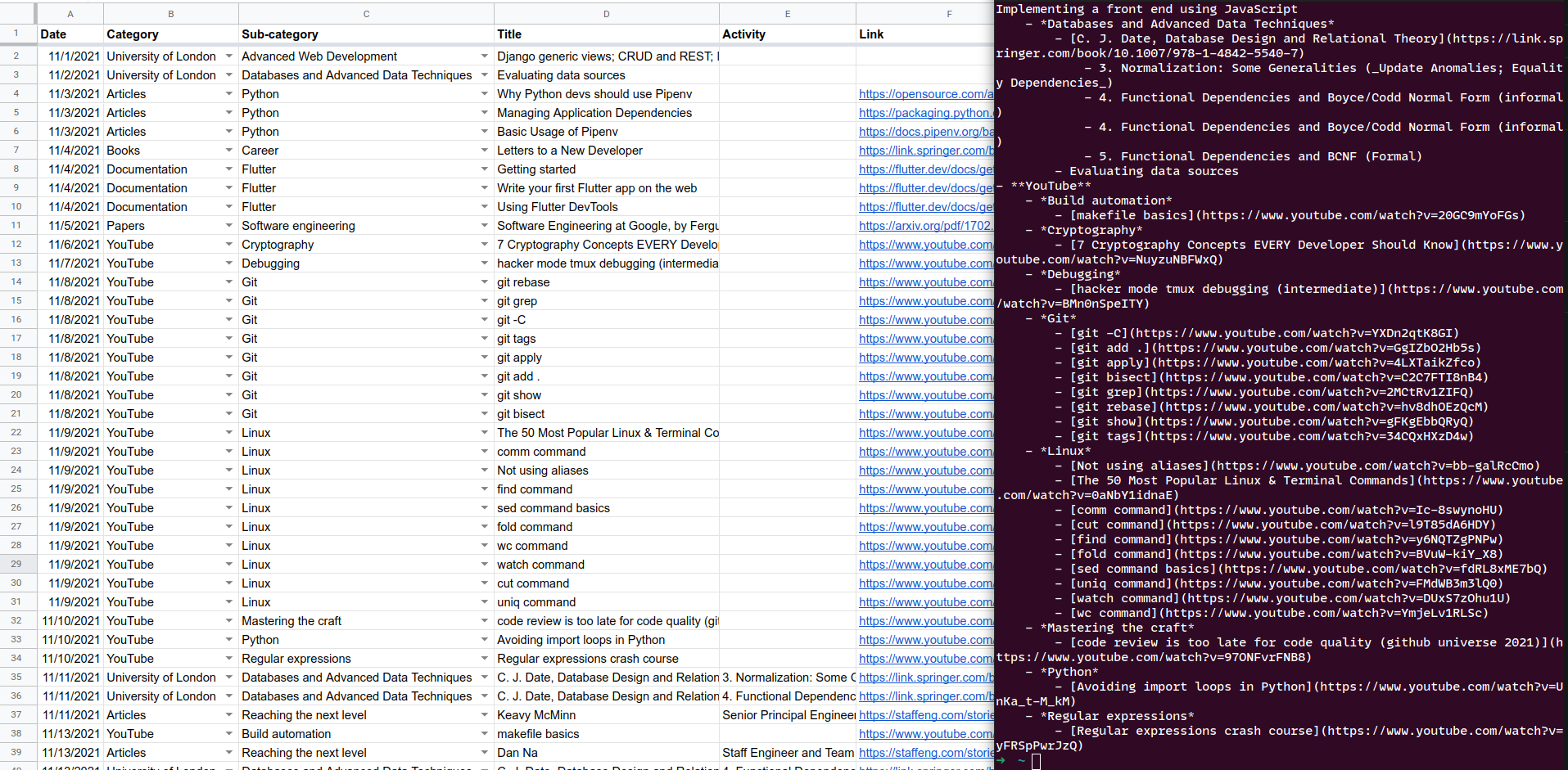
Installing this tool#
Tested only under Python 3.9.7, requires at least Python 3.7+.
Using pip#
- [recommended] Activate a virtual environment.
- To install dependencies, run from this directory:
pip install -r requirements.txt - Then execute the script to run the tool:
python3 get_learning_logs
Using pipenv#
- Run from this directory:
pipenv install. - Activate the newly created virtual environment with
pipenv shell. - Then execute the script to run the tool:
python3 get_learning_logs
How to use this tool#
You will need to create an environment file (default path: ~/.learning-logs or edit the path for LEARNING_LOGS_ENV_PATH in get_learning_logs.py). It should look as follows:
SERVICE_ACCOUNT_FILEPATH="/path/to/service_account_learning_logs.json"
SPREADSHEET_ID=SPREADSHEET_ID  # Found in the URL of the document
WORKSHEET_ID=0  # First sheet is 0 by default, it comes after the URL parameter `gid`
To set up this project, you will have to:
- Enable the Google Sheets API for your project (https://support.google.com/googleapi/answer/6158841?hl=en).
- In the project, search for “service account” in the search bar and create new credentials.
- Download the credentials and put them at the path
SERVICE_ACCOUNT_FILEPATHreferenced in the environment file. - Create a spreadsheet with the following columns (not necessarily in that order):
Date,Category,Sub-category,Title,Activity,Link,Notes.- The column
DateShould match a date format: select all cells from that column, go toFormat > Number > Dateto apply the expected format (mm/dd/yyyy). You can then input a date (e.g.11/1/2021) and you will see a calendar pop up when double-clicking on it. Dragging it down to a new cell will create a new date for the next day (in this example,11/2/2021).
- The column
- Get its
SPREADSHEET_ID(https://docs.google.com/spreadsheets/d/SPREADSHEET_ID_HERE/edit#gid=0) to put it in the environment file. - Get the
WORKSHEET_ID(the integer aftergid=in the URL of the document). - From the spreadsheet document (or from the folder view in Google Drive), share with the email associated with the service account (e.g.
learning-logs-something@project-name-12345.iam.gserviceaccount.com). Read access (“Viewer” permission) is enough.
By now, the script is ready to be called. I just created an alias to execute it more easily by putting the following in ~/.bash_aliases (you will have to adapt the paths of course):
alias learning-logs='~/.local/share/virtualenvs/learning-logs-to-markdown-XJLvhmzn/bin/python3.9 \
  ~/dev/sglavoie/dev-helpers/learning-logs-to-markdown/get_learning_logs.py'
This will output the converted data from the spreadsheet to Markdown as shown above.
Conclusion#
This little tool scratched an itch and will be helpful in making the process of updating the learning progress of this website more straightforward, more convenient and less hands-on! You can find its source code on GitHub.